
Post to social media with AI agents.
sfeed connects your Facebook Pages and Instagram accounts, exposes an MCP server, and lets your agent publish now or schedule posts for later.
- 1. Keep your posts and media in local folders.
- 2. Run
sfeed auth facebook. - 3. Run
sfeed mcp. - 4. Ask your agent to use sfeed to publish according to your rules.
$ sfeed auth facebook
// Opening browser for OAuth...
SUCCESS: Connected to Facebook Page: My Page + Instagram

$ sfeed mcp
SUCCESS: MCP server running on stdio

$ agent "Post this to Facebook and Instagram at 9am tomorrow"
Scheduled facebook for 2026-04-10 09:00
Scheduled instagram for 2026-04-10 09:00
AI Posting
How do I post to social media with AI?
Use sfeed to connect your accounts, run MCP, and let your agent publish to Facebook and Instagram without building your own posting stack.
MCP Server
Run sfeed mcp and let AI agents inspect status, schedule work, and publish on your behalf.
Features
Facebook & Instagram
Post to Facebook Pages and Instagram Business accounts with text, images, videos, previews, and hosted scheduling.
Zero Config Auth
No developer portal. No API keys. Run sfeed auth facebook, approve in the browser, done.
MCP Protocol
Run sfeed mcp and any MCP-compatible agent can check status, preview the queue, schedule posts, and publish on your behalf.
Post To Social Media With AI
If you want the shortest answer, it is this: keep your content on your own machine, connect your accounts with sfeed auth facebook, run sfeed mcp, and tell your agent to use sfeed to publish it. sfeed handles auth, posting, scheduling, previews, and the queue UI.
How The Workflow Splits Up
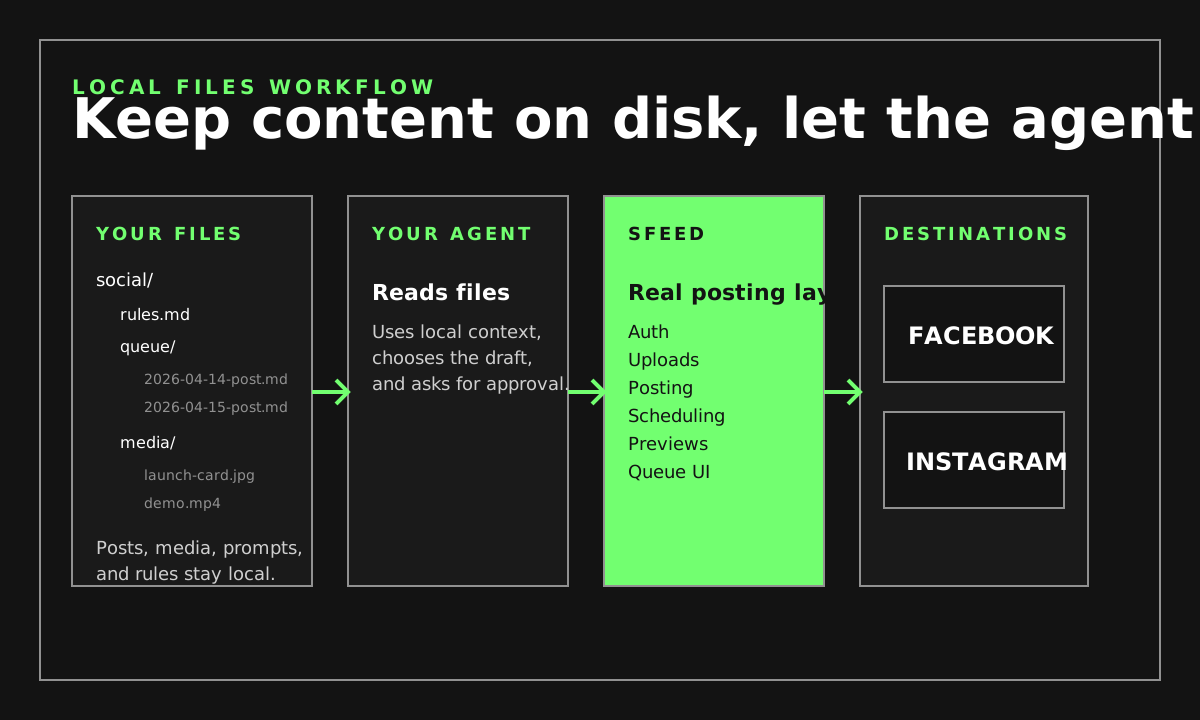
Your Files
Keep drafts, media, prompts, and rules on your own machine.
Your Agent
Reads local context, chooses the draft, and asks for approval.
sfeed
Handles auth, uploads, posting, scheduling, previews, and the queue.
Facebook And Instagram
Receive the final post after your agent calls the real tool.
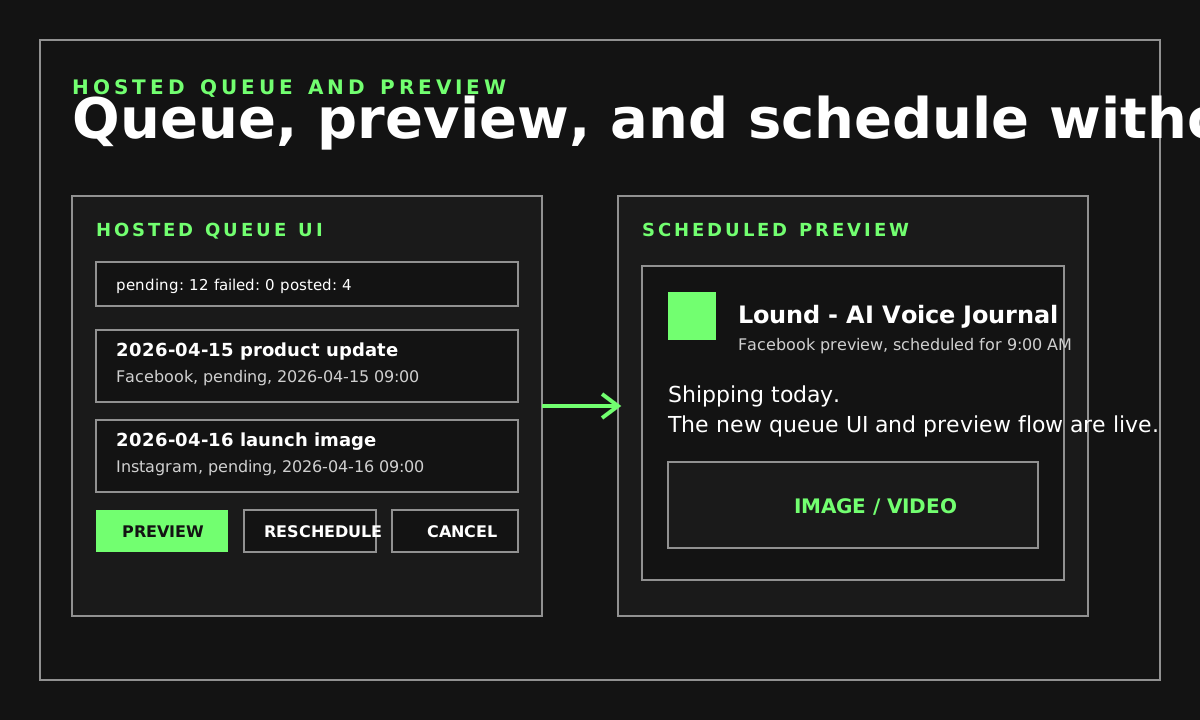
Queue And Preview
Questions
How do I post to social media with AI?
Install sfeed, connect your accounts, run sfeed mcp, and let your agent use the posting and scheduling tools.
Which platforms are supported?
sfeed supports Facebook Pages and Instagram Business or Creator accounts linked to a Facebook Page.
Do my files have to live in a dashboard?
No. Keep posts, media, prompts, and rules on your own machine, and let your agent use sfeed as the posting layer.
Guides
Post To Facebook With AI
Use local files, MCP, and sfeed to publish to Facebook Pages.
Post To Instagram With AI
Use local image and video files, MCP, and sfeed to publish to Instagram.
Schedule Social Posts With AI
Create scheduled posts, open previews, and manage the queue through sfeed.
Local Files Workflow
Keep drafts and media on your own machine, then let your agent use sfeed.
Agent Guides
Cookbook
Short recipes for posting text, images, videos, and scheduled posts.
AI Posting Guide
A direct answer to how to post to social media with AI agents using sfeed.
Codex
Set up MCP, try the first prompt, and record a simple post demo.
Claude Code
Connect sfeed, inspect status, and post a local image through MCP.
OpenCode
Configure sfeed in MCP and schedule a post with one prompt.
Get started
Install the CLI, connect your accounts, start MCP.
curl -fsSL https://sfeed.dev/install.sh | sh Read the Docs