How To Post To Social Media With AI
If you want to post to social media with AI, the shortest path is to connect your accounts and let the agent call a real posting tool. The agent can use the sfeed CLI directly, or it can use MCP tools when you configure them.
The short answer
If you are already in an AI coding agent, start by pointing it at the docs:
Read https://sfeed.dev and onboard me to sfeed.
Install sfeed with https://sfeed.dev/install.sh if it is missing, ask where my posts and media should live, and learn my posting rules.
Connect my Meta accounts, inspect my Pages and Instagram accounts, then show me the first post preview before publishing.
If you want to do the setup yourself, run:
curl -fsSL https://sfeed.dev/install.sh | sh
sfeed auth facebook connect
sfeed auth instagram connect
sfeed status
Run the auth command for each platform you want. Your agent can inspect connected destinations, choose the right account, publish immediately, or schedule posts for later. Add MCP when you want structured tools like sfeed_status, sfeed_destinations, and sfeed_post.
If you only want Instagram posting, run sfeed auth instagram connect. A professional Business or Creator account is required, but a Facebook Page is not.
If your agent supports installable skills, you can also install the main sfeed skill with npx skills add nem035/sfeed --skill sfeed.
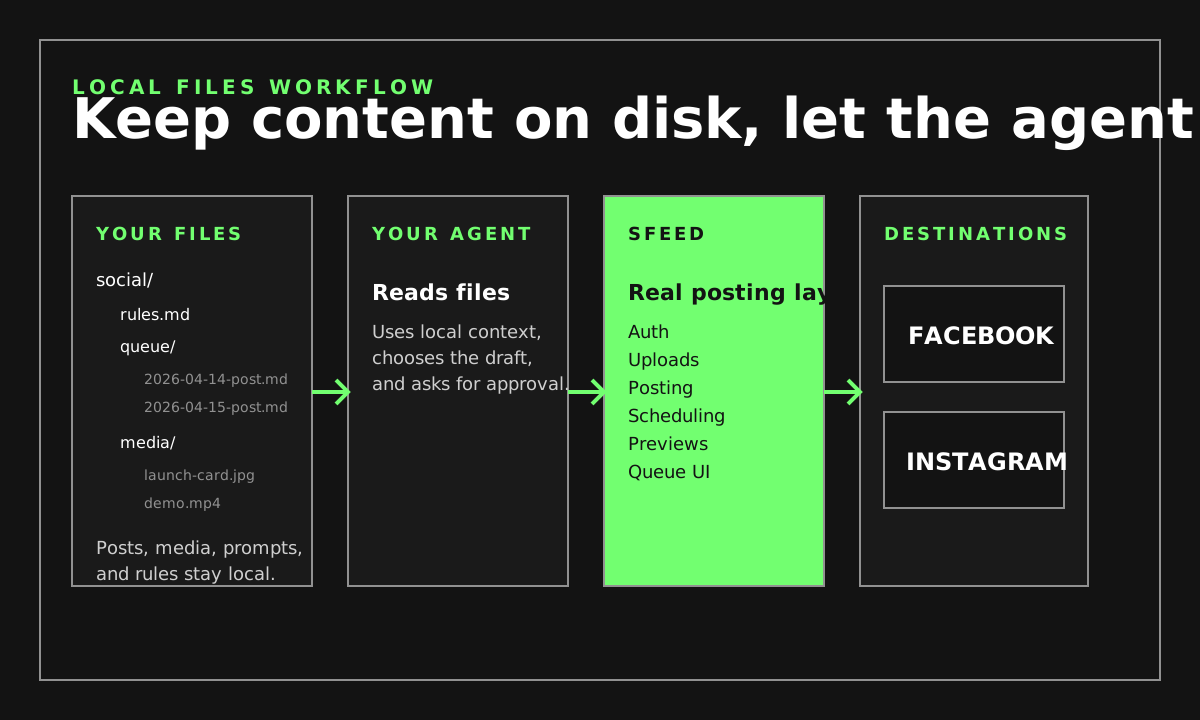
You can keep your posts, media, prompts, and schedules however you want on your own machine. Organize them in folders, Markdown files, scripts, or whatever workflow you already use, then tell Claude, Codex, OpenCode, or another agent to use sfeed to publish them according to your rules.
Local files are the source of truth
content/
  rules.md
  queue/
    2026-04-10-product-post.md
    2026-04-11-instagram-post.md
  media/
    launch-card.jpg
    demo.mp4
This is the core idea: your files stay local, your agent reads them, and sfeed is the publishing layer. You do not need to move your content into a hosted dashboard first.
See Example filesystem setup for a fuller version.
What sfeed handles
- Independent browser auth for Facebook Pages and professional Instagram accounts
- Immediate posting from the terminal or through MCP tools
- Hosted scheduling when the post should run later
- Browser previews and a hosted queue UI for scheduled posts
- Queue actions like reschedule, duplicate, and cancel
Supported post shapes
- Facebook: feed posts, text-only posts, single-image posts, multi-image posts, single-video posts, Page Reels, and Page Stories
- Instagram: feed media, Reels, Stories, and image-only carousels up to 10 items
Typical AI-agent flow
- You connect Facebook, Instagram, or both with the matching auth command
- Your agent reads your local files and rules
- Your agent uses the CLI, or MCP if you configured it
- Your agent checks status and connected destinations
- Your agent drafts the post
- Your agent publishes it now or schedules it for later
Who does what
Your files
Drafts, media, prompts, and rules stay on your machine.
Your agent
Reads local context, prepares the draft, and asks for approval.
sfeed
Handles the real auth, upload, posting, scheduling, previews, and queue actions.
Social platforms
Facebook and Instagram are where the final post is published.
If you want the fuller version of this setup, read Local files social media workflow.
Example prompts
Post this to Facebook: "Shipping v0.1.3 today."

Schedule this Instagram post for tomorrow at 9am with ./launch-card.jpg

Show me my scheduled posts and open the preview for the newest one
For a more realistic flow, tell the agent to read your local content folder and follow your rules file before it posts anything.
Why use sfeed instead of building it yourself
Most AI agents can write text, but they still need a real integration to connect accounts, upload media, schedule posts, and keep a queue. sfeed gives the agent that integration through the CLI and MCP, while you keep control of how the source material is organized on your own machine.
Questions
Can I post to Facebook and Instagram with AI agents?
Yes. sfeed connects Facebook Pages and professional Instagram accounts, exposes an MCP server, and lets AI agents publish now or schedule posts for later.
Can I use sfeed only for Instagram?
Yes. Run sfeed auth instagram connect with a professional Business or Creator account. A Facebook Page is not required.
Do I need my own Facebook app?
No. The default flow is zero-config. Run sfeed auth facebook connect and approve in the browser.
Do I have to move my posts into a hosted dashboard first?
No. You can keep your posts, media, prompts, and schedules on your own machine, and let your agent use sfeed to publish them according to your rules.